Compare commits
| Author | SHA1 | Date | |
|---|---|---|---|
 heavyrian2012 |
d4c6b1f616 | ||
|
imndx
|
ae3eb9c2df | ||
|
heavyrian2012
|
771a4d751f | ||
|
heavyrian2012
|
2bed06cf43 | ||
|
heavyrian2012
|
50f0330884 | ||
|
heavyrian2012
|
acd21faa9c | ||
|
heavyrian2012
|
6e570c74ae | ||
|
heavyrian2012
|
893b58cef4 | ||
|
heavyrian2012
|
bd2b037edb | ||
|
heavyrian2012
|
6acb1c968a | ||
|
heavyrian2012
|
6048748300 | ||
|
heavyrian2012
|
9be49c3d41 | ||
|
heavyrian2012
|
d9eccd39de | ||
|
heavyrian2012
|
ffaffc8fc1 | ||
|
heavyrian2012
|
5e1f4fe6c9 | ||
|
heavyrian2012
|
b5d884f9f6 | ||
|
heavyrian2012
|
c0840f3a73 | ||
|
heavyrian2012
|
34bd59f195 | ||
|
heavyrian2012
|
8e1d56b2ca | ||
|
heavyrian2012
|
a4eb64edd5 | ||
|
heavyrian2012
|
b141990661 | ||
|
imndx
|
0f9df0659f | ||
|
heavyrian2012
|
a2d4bf7d43 | ||
|
heavyrain.lee
|
898c4f2419 | ||
|
heavyrain.lee
|
e1a8a040df | ||
|
heavyrain.lee
|
adb4f082f1 | ||
|
heavyrain.lee
|
2724c79a79 | ||
|
heavyrain.lee
|
ba01c90171 | ||
|
ren-jq101
|
b8967ccaff | ||
|
dependabot[bot]
|
20f71f5a21 | ||
|
dependabot[bot]
|
326f76afd8 | ||
|
dependabot[bot]
|
9f36d47ca8 | ||
|
dependabot[bot]
|
57cdd57a30 |
@@ -4,10 +4,11 @@
|
|||||||
## 功能特性
|
## 功能特性
|
||||||
* 极致地硬件利用率,IM服务最低128M内存即可运行,上不封顶。
|
* 极致地硬件利用率,IM服务最低128M内存即可运行,上不封顶。
|
||||||
* 协议先进,采用MQTT+Protobuf组合,流量和性能极致优化。
|
* 协议先进,采用MQTT+Protobuf组合,流量和性能极致优化。
|
||||||
* 性能强大,专业版IM服务支持百万在线和集群部署。
|
* 性能强大,专业版IM服务支持百万在线和集群部署,业内顶尖性能水平,详情参考野火性能报告。
|
||||||
* 部署运维简单,依赖服务少,稍加配置一键启动。
|
* 部署运维简单,依赖服务少,稍加配置一键启动。
|
||||||
* 安全加密。网络连接AES加密。客户端数据库SqlCipher加密。安全无小事。
|
* 安全加密。网络连接AES加密。客户端数据库SqlCipher加密。安全无小事。
|
||||||
* 全平台客户端,四端同时在线(移动端,pc端,web端和小程序端),数据和状态多端完美同步。
|
* 全平台客户端,支持Android、iOS、Web、小程序、UniApp、Flutter、Windows、Mac OS、Linux等所有常见平台。
|
||||||
|
* 四端同时在线(移动端,pc端,web端和小程序端),数据和状态多端完美同步。
|
||||||
* 支持国产化。支持国产化操作系统、国产化芯片和国产操作系统。支持国密加密。
|
* 支持国产化。支持国产化操作系统、国产化芯片和国产操作系统。支持国密加密。
|
||||||
* 客户端使用微信[mars](https://github.com/tencent/mars)连接库,野火IM可能是最适应中国网络国情的即时通讯服务。
|
* 客户端使用微信[mars](https://github.com/tencent/mars)连接库,野火IM可能是最适应中国网络国情的即时通讯服务。
|
||||||
* 支持加速点加速,即可用于全球应用,也可用于政企内外双网复杂的网络环境。
|
* 支持加速点加速,即可用于全球应用,也可用于政企内外双网复杂的网络环境。
|
||||||
@@ -15,11 +16,14 @@
|
|||||||
* 音视频多种解决方案,丰俭由人,可自由选择。
|
* 音视频多种解决方案,丰俭由人,可自由选择。
|
||||||
* 高级音视频功能强大,支持9人以上的群组视频通话,支持1080P视频,支持会议模式,支持百人以上会议,支持服务器端录制。
|
* 高级音视频功能强大,支持9人以上的群组视频通话,支持1080P视频,支持会议模式,支持百人以上会议,支持服务器端录制。
|
||||||
* 全私有部署,可不依赖任何第三方服务,完全内网部署。
|
* 全私有部署,可不依赖任何第三方服务,完全内网部署。
|
||||||
* 功能齐全,涵盖所有常见即时通讯功能。另外具有强大的可扩展能力。Demo成熟完善,基本可以做到开箱即用,也可把SDK嵌入其它应用。
|
* 功能齐全,涵盖所有常见即时通讯功能。另外具有强大的可扩展能力。代码开源率高,二次开发简单。
|
||||||
|
* 结构设计合理,客户端分功能库、UI库和应用三层。应用成熟完善,开箱即用,也可把SDK嵌入其它应用。
|
||||||
* 拥有应用开放平台,可以开发和创建自建应用,扩展您的工作台。
|
* 拥有应用开放平台,可以开发和创建自建应用,扩展您的工作台。
|
||||||
* API丰富,方便与其它服务系统的对接。
|
* API丰富,方便与其它服务系统的对接。
|
||||||
* 拥有机器人和频道功能。
|
* 拥有机器人和公众号功能。
|
||||||
* 代码开源率高,二次开发简单。可以先试用3到6个月,二开搞定后再购买。
|
* 社区版IM服务和移动端免费商用,可以免费构建出完备的移动互联网应用。
|
||||||
|
* 收费项目非常便宜,野火独有的试用模式,可以先部署到客户环境试用6个月,试用满意后再购买,避免上当受骗。
|
||||||
|
* 技术支持专业和高效,核心研发人员及时处理issue和论坛回复。
|
||||||
|
|
||||||
## 野火开源项目
|
## 野火开源项目
|
||||||
主要包括以下项目:
|
主要包括以下项目:
|
||||||
@@ -27,7 +31,7 @@
|
|||||||
| [GitHub仓库地址](https://github.com/wildfirechat) | [码云仓库地址](https://gitee.com/wfchat) | 说明
|
| [GitHub仓库地址](https://github.com/wildfirechat) | [码云仓库地址](https://gitee.com/wfchat) | 说明
|
||||||
| ------------------------------------------------------------ | ----------------------------------------------------- | --------------------------------------------------------------------------
|
| ------------------------------------------------------------ | ----------------------------------------------------- | --------------------------------------------------------------------------
|
||||||
| [im-server](https://github.com/wildfirechat/im-server) | [im-server](https://gitee.com/wfchat/im-server) | 野火社区版IM服务,野火IM的核心服务,处理所有IM相关业务。 |
|
| [im-server](https://github.com/wildfirechat/im-server) | [im-server](https://gitee.com/wfchat/im-server) | 野火社区版IM服务,野火IM的核心服务,处理所有IM相关业务。 |
|
||||||
| [app_server](https://github.com/wildfirechat/app_server) | [app_server](https://gitee.com/wfchat/app_server) | Demo应用服务,模拟客户的应用服登陆处理逻辑及部分二次开发示例。 |
|
| [app-server](https://github.com/wildfirechat/app-server) | [app-server](https://gitee.com/wfchat/app-server) | Demo应用服务,模拟客户的应用服登陆处理逻辑及部分二次开发示例。 |
|
||||||
| [robot_server](https://github.com/wildfirechat/robot_server) | [robot_server](https://gitee.com/wfchat/robot_server) | 机器人服务,演示野火机器人对接其它系统的方法。 |
|
| [robot_server](https://github.com/wildfirechat/robot_server) | [robot_server](https://gitee.com/wfchat/robot_server) | 机器人服务,演示野火机器人对接其它系统的方法。 |
|
||||||
| [push_server](https://github.com/wildfirechat/push_server) | [push_server](https://gitee.com/wfchat/push_server) | 推送服务器,可以对接所有的系统厂商推送服务或者第三方推送服务。 |
|
| [push_server](https://github.com/wildfirechat/push_server) | [push_server](https://gitee.com/wfchat/push_server) | 推送服务器,可以对接所有的系统厂商推送服务或者第三方推送服务。 |
|
||||||
| [wf-minio](https://github.com/wildfirechat/WF-minio) | [wf-minio](https://gitee.com/wfchat/WF-minio) | 私有对象存储服务,用来支持野火IM专业版的文件存储。 |
|
| [wf-minio](https://github.com/wildfirechat/WF-minio) | [wf-minio](https://gitee.com/wfchat/WF-minio) | 私有对象存储服务,用来支持野火IM专业版的文件存储。 |
|
||||||
@@ -48,6 +52,9 @@
|
|||||||
## 野火开发文档
|
## 野火开发文档
|
||||||
[在线文档](https://docs.wildfirechat.cn/)
|
[在线文档](https://docs.wildfirechat.cn/)
|
||||||
|
|
||||||
|
## 野火性能测试报告及测试方法
|
||||||
|
[Github](https://github.com/wildfirechat/Performance_Test), [码云](https://gitee.com/wfchat/Performance_Test)。
|
||||||
|
|
||||||
## 野火Demo
|
## 野火Demo
|
||||||
请使用微信扫码下载安装体验野火IM移动客户端
|
请使用微信扫码下载安装体验野火IM移动客户端
|
||||||
|
|
||||||
@@ -62,7 +69,9 @@ PC客户端点[这里](https://github.com/wildfirechat/vue-pc-chat/releases)下
|
|||||||

|

|
||||||
|
|
||||||
## 快速使用
|
## 快速使用
|
||||||
野火提供免费的社区版IM服务和移动端,包括完整的移动端即时通讯和实时音视频功能,可以无条件商用。您可以直接从开源项目里下载到完整的后端和移动端产品,包括社区版IM服务、应用服务、开放平台服务、频道(公众号)服务、机器人服务、推送服务以及Android和iOS端源码。可以按照[快速开始](https://docs.wildfirechat.cn/quick_start/)来部署应用服务和IM服务,然后打包移动端,以最小化运行。之后可以详细阅读文档部署其他支撑服务。
|
可以按照[快速开始](https://docs.wildfirechat.cn/quick_start/)来部署应用服务和IM服务,然后打包移动端,就可以完成聊天和通话功能。
|
||||||
|
|
||||||
|
之后再部署开放平台服务、频道(公众号)服务、机器人服务、推送服务、Turn服务(音视频服务)来实现完整的应用功能,详情可以详细阅读文档。
|
||||||
|
|
||||||
## 应用截图
|
## 应用截图
|
||||||
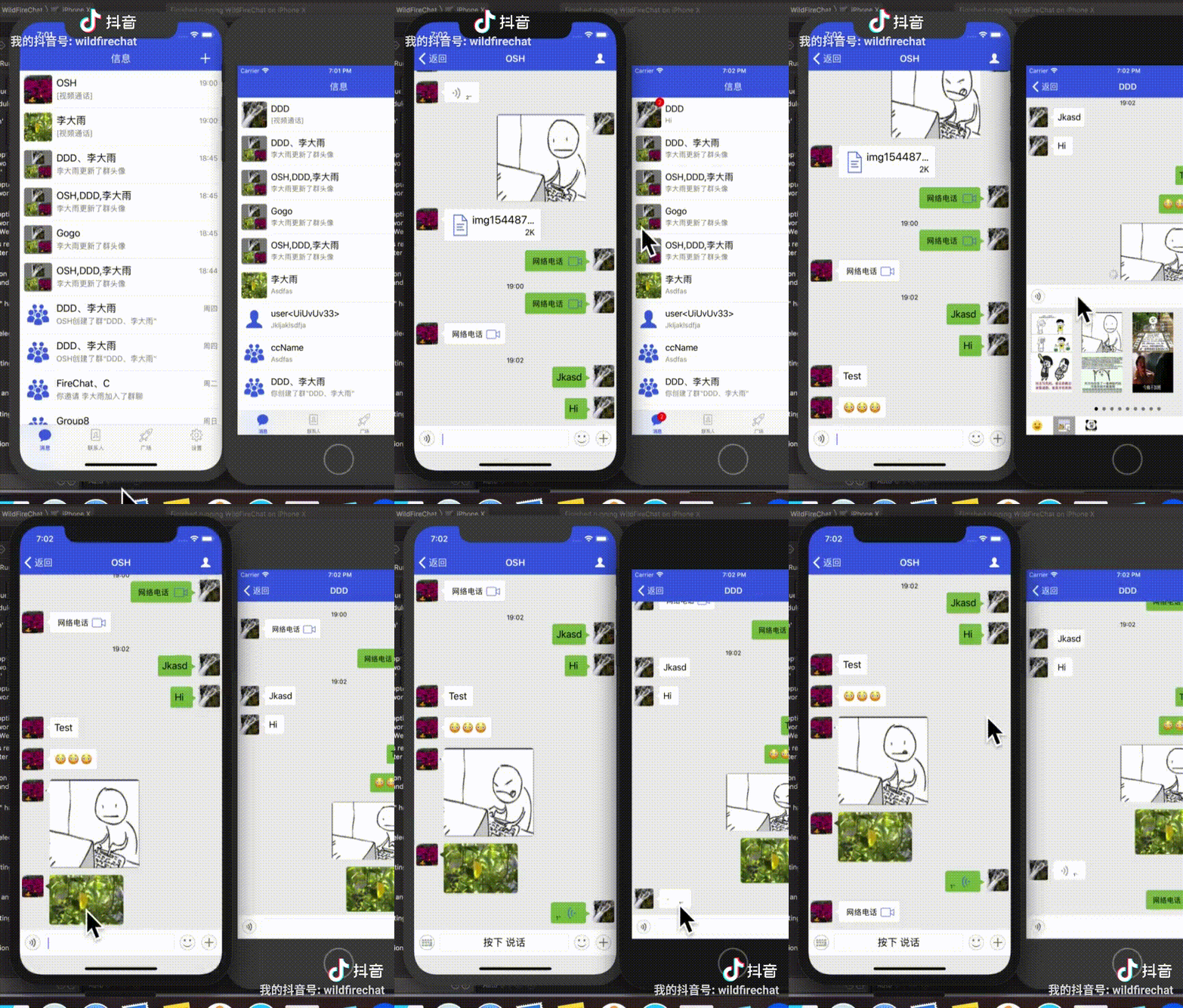
|

|
||||||
@@ -89,46 +98,56 @@ PC客户端点[这里](https://github.com/wildfirechat/vue-pc-chat/releases)下
|
|||||||
|
|
||||||
|
|
||||||
## 编译
|
## 编译
|
||||||
在安装JDK1.8以上及maven的前提下,在命令行中执行```mvn clean package```,生成的目标文件在```./distribution/target/distribution-xxxx-bundle-tar.tar.gz```
|
由于```distribution/pom.xml```中使用了生成RPM包的plugin,所以需要本地安装有rpm。如果不需要RPM包,可以删除掉```distribution/pom.xml```文件中的RPM plugin。
|
||||||
> 由于使用了一个git的maven插件,如果本地没有git信息就会编译出错,请使用```git clone```的方法下载代码,或者下载压缩包解压后在根目录创建```.git```的空目录。建议用```git clone```的方式下载代码。
|
|
||||||
|
在安装RPM后或者删除```distribution/pom.xml```文件中的RPM plugin后,执行下面命令:
|
||||||
|
```
|
||||||
|
mvn clean package
|
||||||
|
```
|
||||||
|
生成的目标文件在```./distribution/target/distribution-xxxx-bundle-tar.tar.gz```
|
||||||
|
|
||||||
## 配置
|
## 配置
|
||||||
解压```distribution-xxxx-bundle-tar.tar.gz```,修改解压出来的```config```目录下的```wildfirechat.conf```。修改如下部分:
|
解压```distribution-xxxx-bundle-tar.tar.gz```,修改解压出来的```config```目录下的```wildfirechat.conf```,可以阅读配置文件注释和文档,对其它配置项进行调整。
|
||||||
1. 修改```server.ip```为您的服务器的公网IP,或者域名。如果用域名需要做好域名解析。
|
|
||||||
2. 可以阅读配置文件注释和文档,对其它配置项进行调整。
|
|
||||||
|
|
||||||
## 运行
|
## 运行
|
||||||
在程序目录运行如下命令:
|
在解压```distribution-xxxx-bundle-tar.tar.gz```后的目录下运行如下命令:
|
||||||
```
|
```
|
||||||
./bin/wildfirechat.sh
|
./bin/wildfirechat.sh
|
||||||
```
|
```
|
||||||
|
|
||||||
## 验证
|
## 验证
|
||||||
1. 在浏览器中输入地址 ```http://${ip}/api/version```可以看到返回一个json文件。
|
1. 在浏览器中输入地址 ```http://${ip}/api/version```可以看到返回一个json文件。
|
||||||
2. 部署[应用服务](应用服务),配置和编译[Android客户端](https://github.com/wildfirechat/android-chat)和[iOS客户端](https://github.com/wildfirechat/ios-chat)进行验证。详情可参考[快速开始](https://docs.wildfirechat.cn/quick_start/)。
|
2. 部署[应用服务](https://github.com/wildfirechat/app-server),配置和编译[Android客户端](https://github.com/wildfirechat/android-chat)和[iOS客户端](https://github.com/wildfirechat/ios-chat)进行验证。详情可参考[快速开始](https://docs.wildfirechat.cn/quick_start/)。
|
||||||
|
|
||||||
## 升级说明
|
## 升级说明
|
||||||
1. 从0.42 版本增加了群成员数限制,默认为2000。如果您从之前的版本升级到这个版本或以后,需要注意到群成员数的限制。升级之后超出限制的群不受影响,但不能继续加人,如果您想修改默认值,可以在升级版本之后,修改t_setting表,把默认的大小改为您期望的人数。另外修改t_group表,把已经存在的群组max_member_count改成您期望的,然后重启。
|
1. 从0.42 版本增加了群成员数限制,默认为2000。如果您从之前的版本升级到这个版本或以后,需要注意到群成员数的限制。升级之后超出限制的群不受影响,但不能继续加人,如果您想修改默认值,可以在升级版本之后,修改t_setting表,把默认的大小改为您期望的人数。另外修改t_group表,把已经存在的群组max_member_count改成您期望的,然后重启。
|
||||||
2. 0.46和0.47版本升级到0.48及以后版本时,可能会提示flyway migrate 38错误,请执行 [修复脚本](https://github.com/wildfirechat/server/blob/wildfirechat/flyway_repaire_migrate_38.sql) 进行修复。0.46和0.47版本之外的版本不会出现此问题。
|
2. 0.50版本添加了是否允许客户端发送群操作通知的配置。如果您在客户端自定义群通知,需要在服务器端配置允许,没有使用自定义群操作通知的不受影响。***
|
||||||
3. 从0.54之前版本升级到0.54及以后版本时,会提示flyway migrate错误。因为0.54版本删除了sql脚本中默认敏感词的内容,flyway checksum失败。请执行```update flyway_schema_history set checksum = 0 where script = 'V17__add_default_sensitive_word.sql';```来修复。
|
3. 0.46和0.47版本升级到0.48及以后版本时,可能会提示flyway migrate 38错误,请执行 [修复脚本](https://github.com/wildfirechat/server/blob/wildfirechat/flyway_repaire_migrate_38.sql) 进行修复。0.46和0.47版本之外的版本不会出现此问题。
|
||||||
4. 从0.59之前的版本升级到之后的版本执行数据库升级时间比较长,请耐心等待提示运行成功,避免中途中断。
|
4. 从0.54之前版本升级到0.54及以后版本时,会提示flyway migrate错误。因为0.54版本删除了sql脚本中默认敏感词的内容,flyway checksum失败。请执行```update flyway_schema_history set checksum = 0 where script = 'V17__add_default_sensitive_word.sql';```来修复。
|
||||||
|
5. 从0.59之前的版本升级到之后的版本执行数据库升级时间比较长,请耐心等待提示运行成功,避免中途中断。
|
||||||
|
6. 0.62/0.63 版本有严重的问题,请使用0.64及以后版本,或者0.61版。
|
||||||
|
7. 从0.68 版本起添加了pc在线是否默认手机接收推送的开关,默认为开,与以前版本作用相反,请注意兼容(可以关掉与之前保持一致或者升级客户端)
|
||||||
|
8. 从0.78 版本起把MySQL数据库中关键字都改为大小写敏感,另外生成id的方法也做了改变,只生成小写的id,避免出现id重复的问题,建议所有客户都升级
|
||||||
|
9. 从0.79 版本起把log4j升级到log4j2,因为log4j已经不再维护而且还有已知的漏洞,建议所有客户都升级,升级时注意更新log4j2的配置文件
|
||||||
|
10. 0.97版本更改了启动脚本```wildfirechat.sh```,如果是升级服务,请注意更新启动脚本。
|
||||||
|
|
||||||
|
|
||||||
## 联系我们
|
## 联系我们
|
||||||
|
|
||||||
商务合作请使用如下邮箱和微信联系:
|
商务合作请微信联系:
|
||||||
|
|
||||||
邮箱: support@wildfirechat.cn 微信1:wfchat 微信2:wildfirechat
|
* 微信1:wildfirechat
|
||||||
|
* 微信2:wfchat
|
||||||
|
|
||||||
## 问题交流
|
## 问题交流
|
||||||
|
|
||||||
1. 如果大家发现bug,请在GitHub提issue;如果有需求也请给我们提issue。
|
1. 如果大家发现bug,请在GitHub或码云提issue;如果有需求也请给我们提issue。
|
||||||
2. 其他问题,请到[野火IM论坛](http://bbs.wildfirechat.cn/)进行交流学习
|
2. 其他问题,请到[野火IM论坛](http://bbs.wildfirechat.cn/)进行交流学习
|
||||||
3. 关注我们的公众号。我们有新版本发布或者有重大更新会通过公众号通知大家,另外我们也会不定期的发布一些关于野火IM的技术介绍。
|
3. 关注我们的公众号。我们有新版本发布或者有重大更新会通过公众号通知大家,另外我们也会不定期的发布一些关于野火IM的技术介绍。
|
||||||
|
|
||||||
<img src="http://static.wildfirechat.cn/wx_wfc_qrcode.jpg" width = 50% height = 50% />
|
<img src="http://static.wildfirechat.cn/wx_wfc_qrcode.jpg" width = 50% height = 50% />
|
||||||
|
|
||||||
> 我们有研发工程师轮流值班处理issue和论坛,一般简单问题几个小时就会回复一遍,疑难Bug的修改和新需求的开发我们也会尽快解决。
|
我们有核心研发工程师轮流值班处理issue和论坛,会及时处理的,疑难Bug的修改和新需求的开发我们也会尽快解决。
|
||||||
|
|
||||||
## 特别感谢
|
## 特别感谢
|
||||||
1. [moquette](https://github.com/moquette-io/moquette) 本项目是基于此项目二次开发而来,处理MQTT相关业务。
|
1. [moquette](https://github.com/moquette-io/moquette) 本项目是基于此项目二次开发而来,处理MQTT相关业务。
|
||||||
|
|||||||
@@ -1,3 +0,0 @@
|
|||||||
#native2ascii -encoding UTF-8 messages.properties temp_messages.properties
|
|
||||||
Above_Greeting_Message=\u4ee5\u4e0a\u662f\u6253\u62db\u547c\u4fe1\u606f
|
|
||||||
Friend_Can_Start_Chat=\u4f60\u4eec\u5df2\u7ecf\u6210\u4e3a\u597d\u53cb\u4e86\uff0c\u73b0\u5728\u53ef\u4ee5\u5f00\u59cb\u804a\u5929\u4e86
|
|
||||||
@@ -1,2 +0,0 @@
|
|||||||
Above_Greeting_Message=This's the greeting
|
|
||||||
Friend_Can_Start_Chat=You're already friend, start chat now.
|
|
||||||
@@ -1,2 +0,0 @@
|
|||||||
Above_Greeting_Message=This's the greeting
|
|
||||||
Friend_Can_Start_Chat=You're already friend, start chat now.
|
|
||||||
@@ -1,2 +0,0 @@
|
|||||||
Above_Greeting_Message=\u4ee5\u4e0a\u662f\u6253\u62db\u547c\u4fe1\u606f
|
|
||||||
Friend_Can_Start_Chat=\u4f60\u4eec\u5df2\u7ecf\u6210\u4e3a\u597d\u53cb\u4e86\uff0c\u73b0\u5728\u53ef\u4ee5\u5f00\u59cb\u804a\u5929\u4e86
|
|
||||||
@@ -1,2 +0,0 @@
|
|||||||
Above_Greeting_Message=\u4ee5\u4e0a\u662f\u6253\u62db\u547c\u4fe1\u606f
|
|
||||||
Friend_Can_Start_Chat=\u4f60\u4eec\u5df2\u7ecf\u6210\u4e3a\u597d\u53cb\u4e86\uff0c\u73b0\u5728\u53ef\u4ee5\u5f00\u59cb\u804a\u5929\u4e86
|
|
||||||
@@ -42,6 +42,9 @@ embed.db 1
|
|||||||
## 使用mongodb时次开关无效(因为mongodb设置了消息过期时间,会自动清理,仅专业版支持mongodb)。
|
## 使用mongodb时次开关无效(因为mongodb设置了消息过期时间,会自动清理,仅专业版支持mongodb)。
|
||||||
db.auto_clean_history_messages true
|
db.auto_clean_history_messages true
|
||||||
|
|
||||||
|
## h2db数据库的路径,默认为程序目录下的,可以指定其他目录。如果使用MySQL,可以忽略此配置
|
||||||
|
h2db.path ./h2db/wfchat
|
||||||
|
|
||||||
##服务器管理接口密钥。如果修改此端口需要同步修改使用管理API的地方,比如应用服务。
|
##服务器管理接口密钥。如果修改此端口需要同步修改使用管理API的地方,比如应用服务。
|
||||||
http.admin.secret_key 123456
|
http.admin.secret_key 123456
|
||||||
|
|
||||||
@@ -139,12 +142,6 @@ friend.reject_request_duration 2592000000
|
|||||||
##好友请求过期时间,单位是毫秒,默认是7天,0为无限长期限。
|
##好友请求过期时间,单位是毫秒,默认是7天,0为无限长期限。
|
||||||
friend.request_expiration_duration 604800000
|
friend.request_expiration_duration 604800000
|
||||||
|
|
||||||
##添加好友后会发送欢迎消息,比如"你们已经是好友了,可以聊天了"。这个开关控制是用旧的方式还是用新的方式。
|
|
||||||
##旧的方式会发送notification消息(contenttype是80),内容会根据好友接收者的语言选择对应的语言,如果双方语言不一致会导致另外一方看到的不是本地语言。
|
|
||||||
##新的方式会发送添加好友消息(contenttype是93)和欢迎消息(contenttype是92),需要客户端实现这两种消息。
|
|
||||||
##如果客户端已经实现这两种消息可以打开这个开关(客户端2020.6.30添加了此消息类型)。
|
|
||||||
friend.new_welcome_message true
|
|
||||||
|
|
||||||
## 聊天室观众空闲退出时间,单位为毫秒,默认为15分钟,0为永远不退出
|
## 聊天室观众空闲退出时间,单位为毫秒,默认为15分钟,0为永远不退出
|
||||||
chatroom.participant_idle_time 900000
|
chatroom.participant_idle_time 900000
|
||||||
|
|
||||||
@@ -190,11 +187,6 @@ http.channel.rate_limit 1000
|
|||||||
##客户端请求频率限制,默认是5秒100次。通常情况下不要修改这个值。
|
##客户端请求频率限制,默认是5秒100次。通常情况下不要修改这个值。
|
||||||
client.request_rate_limit 100
|
client.request_rate_limit 100
|
||||||
|
|
||||||
#*********************************************************************
|
|
||||||
# hazelcase configuration
|
|
||||||
#*********************************************************************
|
|
||||||
hazelcast.configuration config/hazelcast.xml
|
|
||||||
|
|
||||||
#*********************************************************************
|
#*********************************************************************
|
||||||
# Media server configuration
|
# Media server configuration
|
||||||
#*********************************************************************
|
#*********************************************************************
|
||||||
|
|||||||
+4
-4
@@ -1,11 +1,11 @@
|
|||||||
<project xmlns:xsi="http://www.w3.org/2001/XMLSchema-instance" xmlns="http://maven.apache.org/POM/4.0.0"
|
<?xml version="1.0" encoding="UTF-8"?>
|
||||||
xsi:schemaLocation="http://maven.apache.org/POM/4.0.0 http://maven.apache.org/xsd/maven-4.0.0.xsd">
|
<project xmlns="http://maven.apache.org/POM/4.0.0" xmlns:xsi="http://www.w3.org/2001/XMLSchema-instance" xsi:schemaLocation="http://maven.apache.org/POM/4.0.0 http://maven.apache.org/xsd/maven-4.0.0.xsd">
|
||||||
<modelVersion>4.0.0</modelVersion>
|
<modelVersion>4.0.0</modelVersion>
|
||||||
<parent>
|
<parent>
|
||||||
<relativePath>../</relativePath>
|
<relativePath>../</relativePath>
|
||||||
<artifactId>wildfirechat-parent</artifactId>
|
<artifactId>wildfirechat-parent</artifactId>
|
||||||
<groupId>cn.wildfirechat</groupId>
|
<groupId>cn.wildfirechat</groupId>
|
||||||
<version>0.96</version>
|
<version>0.97</version>
|
||||||
</parent>
|
</parent>
|
||||||
|
|
||||||
<artifactId>moquette-broker</artifactId>
|
<artifactId>moquette-broker</artifactId>
|
||||||
@@ -120,7 +120,7 @@
|
|||||||
<dependency>
|
<dependency>
|
||||||
<groupId>commons-codec</groupId>
|
<groupId>commons-codec</groupId>
|
||||||
<artifactId>commons-codec</artifactId>
|
<artifactId>commons-codec</artifactId>
|
||||||
<version>1.10</version>
|
<version>1.13</version>
|
||||||
</dependency>
|
</dependency>
|
||||||
|
|
||||||
<dependency>
|
<dependency>
|
||||||
|
|||||||
@@ -112,6 +112,8 @@ public final class BrokerConstants {
|
|||||||
|
|
||||||
public static final String EMBED_DB_PROPERTY_NAME = "embed.db";
|
public static final String EMBED_DB_PROPERTY_NAME = "embed.db";
|
||||||
public static final String DB_AUTO_CLEAN_HISTORY_MESSAGES = "db.auto_clean_history_messages";
|
public static final String DB_AUTO_CLEAN_HISTORY_MESSAGES = "db.auto_clean_history_messages";
|
||||||
|
public static final String H2DB_PATH = "h2db.path";
|
||||||
|
|
||||||
|
|
||||||
public static final String SENSITIVE_Filter_Type = "sensitive.filter.type";
|
public static final String SENSITIVE_Filter_Type = "sensitive.filter.type";
|
||||||
|
|
||||||
@@ -154,7 +156,6 @@ public final class BrokerConstants {
|
|||||||
public static final String FRIEND_Repeat_Request_Duration = "friend.repeat_request_duration";
|
public static final String FRIEND_Repeat_Request_Duration = "friend.repeat_request_duration";
|
||||||
public static final String FRIEND_Reject_Request_Duration = "friend.reject_request_duration";
|
public static final String FRIEND_Reject_Request_Duration = "friend.reject_request_duration";
|
||||||
public static final String FRIEND_Request_Expiration_Duration = "friend.request_expiration_duration";
|
public static final String FRIEND_Request_Expiration_Duration = "friend.request_expiration_duration";
|
||||||
public static final String FRIEND_New_Welcome_Message = "friend.new_welcome_message";
|
|
||||||
|
|
||||||
public static final String CHATROOM_Participant_Idle_Time = "chatroom.participant_idle_time";
|
public static final String CHATROOM_Participant_Idle_Time = "chatroom.participant_idle_time";
|
||||||
public static final String CHATROOM_Rejoin_When_Active = "chatroom.rejoin_when_active";
|
public static final String CHATROOM_Rejoin_When_Active = "chatroom.rejoin_when_active";
|
||||||
|
|||||||
@@ -10,12 +10,10 @@ package io.moquette.imhandler;
|
|||||||
|
|
||||||
import cn.wildfirechat.proto.ProtoConstants;
|
import cn.wildfirechat.proto.ProtoConstants;
|
||||||
import cn.wildfirechat.proto.WFCMessage;
|
import cn.wildfirechat.proto.WFCMessage;
|
||||||
import io.moquette.persistence.MemorySessionStore;
|
|
||||||
import io.moquette.spi.impl.Qos1PublishHandler;
|
import io.moquette.spi.impl.Qos1PublishHandler;
|
||||||
import io.netty.buffer.ByteBuf;
|
import io.netty.buffer.ByteBuf;
|
||||||
import cn.wildfirechat.common.ErrorCode;
|
import cn.wildfirechat.common.ErrorCode;
|
||||||
import io.netty.util.internal.StringUtil;
|
import io.netty.util.internal.StringUtil;
|
||||||
import win.liyufan.im.I18n;
|
|
||||||
import win.liyufan.im.IMTopic;
|
import win.liyufan.im.IMTopic;
|
||||||
import win.liyufan.im.MessageShardingUtil;
|
import win.liyufan.im.MessageShardingUtil;
|
||||||
|
|
||||||
@@ -43,17 +41,8 @@ public class HandleFriendRequestHandler extends IMHandler<WFCMessage.HandleFrien
|
|||||||
saveAndPublish(request.getTargetUid(), null, builder.build(), requestSourceType);
|
saveAndPublish(request.getTargetUid(), null, builder.build(), requestSourceType);
|
||||||
}
|
}
|
||||||
|
|
||||||
MemorySessionStore.Session session = m_sessionsStore.getSession(clientID);
|
|
||||||
String language = "zh_CN";
|
|
||||||
if (session != null && !StringUtil.isNullOrEmpty(session.getLanguage())) {
|
|
||||||
language = session.getLanguage();
|
|
||||||
}
|
|
||||||
WFCMessage.MessageContent.Builder contentBuilder = WFCMessage.MessageContent.newBuilder();
|
WFCMessage.MessageContent.Builder contentBuilder = WFCMessage.MessageContent.newBuilder();
|
||||||
if (m_messagesStore.isNewFriendWelcomeMessage()) {
|
contentBuilder.setType(92);
|
||||||
contentBuilder.setType(92);
|
|
||||||
} else {
|
|
||||||
contentBuilder.setType(90).setContent(I18n.getString(language, "Above_Greeting_Message"));
|
|
||||||
}
|
|
||||||
|
|
||||||
builder = WFCMessage.Message.newBuilder();
|
builder = WFCMessage.Message.newBuilder();
|
||||||
builder.setFromUser(request.getTargetUid());
|
builder.setFromUser(request.getTargetUid());
|
||||||
@@ -64,13 +53,7 @@ public class HandleFriendRequestHandler extends IMHandler<WFCMessage.HandleFrien
|
|||||||
messageId = MessageShardingUtil.generateId();
|
messageId = MessageShardingUtil.generateId();
|
||||||
builder.setMessageId(messageId);
|
builder.setMessageId(messageId);
|
||||||
saveAndPublish(request.getTargetUid(), null, builder.build(), requestSourceType);
|
saveAndPublish(request.getTargetUid(), null, builder.build(), requestSourceType);
|
||||||
|
contentBuilder.setType(93);
|
||||||
if (m_messagesStore.isNewFriendWelcomeMessage()) {
|
|
||||||
contentBuilder.setType(93);
|
|
||||||
} else {
|
|
||||||
contentBuilder.setContent(I18n.getString(language, "Friend_Can_Start_Chat"));
|
|
||||||
}
|
|
||||||
|
|
||||||
builder.setContent(contentBuilder);
|
builder.setContent(contentBuilder);
|
||||||
messageId = MessageShardingUtil.generateId();
|
messageId = MessageShardingUtil.generateId();
|
||||||
builder.setMessageId(messageId);
|
builder.setMessageId(messageId);
|
||||||
|
|||||||
@@ -138,7 +138,6 @@ public class MemoryMessagesStore implements IMessagesStore {
|
|||||||
private long mFriendRequestDuration = 7 * 24 * 60 * 60 * 1000;
|
private long mFriendRequestDuration = 7 * 24 * 60 * 60 * 1000;
|
||||||
private long mFriendRejectDuration = 30 * 24 * 60 * 60 * 1000;
|
private long mFriendRejectDuration = 30 * 24 * 60 * 60 * 1000;
|
||||||
private long mFriendRequestExpiration = 7 * 24 * 60 * 60 * 1000;
|
private long mFriendRequestExpiration = 7 * 24 * 60 * 60 * 1000;
|
||||||
private boolean mFriendNewWelcomeMessage = true;
|
|
||||||
|
|
||||||
private boolean mMultiPlatformNotification = false;
|
private boolean mMultiPlatformNotification = false;
|
||||||
private boolean mMobileDefaultSilentWhenPCOnline = true;
|
private boolean mMobileDefaultSilentWhenPCOnline = true;
|
||||||
@@ -256,15 +255,6 @@ public class MemoryMessagesStore implements IMessagesStore {
|
|||||||
printMissConfigLog(FRIEND_Request_Expiration_Duration, mFriendRequestExpiration + "");
|
printMissConfigLog(FRIEND_Request_Expiration_Duration, mFriendRequestExpiration + "");
|
||||||
}
|
}
|
||||||
|
|
||||||
try {
|
|
||||||
mFriendNewWelcomeMessage = Boolean.parseBoolean(m_Server.getConfig().getProperty(FRIEND_New_Welcome_Message));
|
|
||||||
} catch (Exception e) {
|
|
||||||
e.printStackTrace();
|
|
||||||
Utility.printExecption(LOG, e);
|
|
||||||
printMissConfigLog(FRIEND_New_Welcome_Message, mFriendNewWelcomeMessage + "");
|
|
||||||
}
|
|
||||||
|
|
||||||
|
|
||||||
try {
|
try {
|
||||||
mChatroomRejoinWhenActive = Boolean.parseBoolean(m_Server.getConfig().getProperty(BrokerConstants.CHATROOM_Rejoin_When_Active));
|
mChatroomRejoinWhenActive = Boolean.parseBoolean(m_Server.getConfig().getProperty(BrokerConstants.CHATROOM_Rejoin_When_Active));
|
||||||
} catch (Exception e) {
|
} catch (Exception e) {
|
||||||
@@ -3372,10 +3362,12 @@ public class MemoryMessagesStore implements IMessagesStore {
|
|||||||
if(robotData != null && !StringUtil.isNullOrEmpty(robotData.getCallback()) && !StringUtil.isNullOrEmpty(robotData.getSecret())) {
|
if(robotData != null && !StringUtil.isNullOrEmpty(robotData.getCallback()) && !StringUtil.isNullOrEmpty(robotData.getSecret())) {
|
||||||
try {
|
try {
|
||||||
URL url = new URL(robotData.getCallback());
|
URL url = new URL(robotData.getCallback());
|
||||||
if(url.getHost().equals(host)) {
|
if(url.getHost() == null) {
|
||||||
|
LOG.error("get application auth code error, application callback is invalid url");
|
||||||
|
} else if(url.getHost().equals(host)) {
|
||||||
secret = robotData.getSecret();
|
secret = robotData.getSecret();
|
||||||
} else {
|
} else {
|
||||||
LOG.warn("get application auth code error, request host is not the same host with callback host");
|
LOG.error("get application auth code error, request host is not the same host with callback host");
|
||||||
}
|
}
|
||||||
} catch (MalformedURLException e) {
|
} catch (MalformedURLException e) {
|
||||||
e.printStackTrace();
|
e.printStackTrace();
|
||||||
@@ -3396,10 +3388,12 @@ public class MemoryMessagesStore implements IMessagesStore {
|
|||||||
if(channelData != null && !StringUtil.isNullOrEmpty(channelData.getCallback()) && !StringUtil.isNullOrEmpty(channelData.getSecret())) {
|
if(channelData != null && !StringUtil.isNullOrEmpty(channelData.getCallback()) && !StringUtil.isNullOrEmpty(channelData.getSecret())) {
|
||||||
try {
|
try {
|
||||||
URL url = new URL(channelData.getCallback());
|
URL url = new URL(channelData.getCallback());
|
||||||
if(url.getHost().equals(host)) {
|
if(url.getHost() == null) {
|
||||||
|
LOG.error("get application auth code error, application callback is invalid url");
|
||||||
|
} else if(url.getHost().equals(host)) {
|
||||||
secret = channelData.getSecret();
|
secret = channelData.getSecret();
|
||||||
} else {
|
} else {
|
||||||
LOG.warn("get application auth code error, request host is not the same host with callback host");
|
LOG.error("get application auth code error, request host is not the same host with callback host");
|
||||||
}
|
}
|
||||||
} catch (MalformedURLException e) {
|
} catch (MalformedURLException e) {
|
||||||
e.printStackTrace();
|
e.printStackTrace();
|
||||||
@@ -3505,11 +3499,6 @@ public class MemoryMessagesStore implements IMessagesStore {
|
|||||||
return ErrorCode.ERROR_CODE_AUTH_FAILURE;
|
return ErrorCode.ERROR_CODE_AUTH_FAILURE;
|
||||||
}
|
}
|
||||||
|
|
||||||
@Override
|
|
||||||
public boolean isNewFriendWelcomeMessage() {
|
|
||||||
return mFriendNewWelcomeMessage;
|
|
||||||
}
|
|
||||||
|
|
||||||
@Override
|
@Override
|
||||||
public ErrorCode deleteFriend(String userId, String friendUid, long[] head) {
|
public ErrorCode deleteFriend(String userId, String friendUid, long[] head) {
|
||||||
HazelcastInstance hzInstance = m_Server.getHazelcastInstance();
|
HazelcastInstance hzInstance = m_Server.getHazelcastInstance();
|
||||||
|
|||||||
@@ -415,7 +415,7 @@ public class MemorySessionStore implements ISessionsStore {
|
|||||||
remove = true;
|
remove = true;
|
||||||
}
|
}
|
||||||
} else if(platform == ProtoConstants.Platform.Platform_OSX || platform == ProtoConstants.Platform.Platform_Windows || platform == ProtoConstants.Platform.Platform_LINUX) {
|
} else if(platform == ProtoConstants.Platform.Platform_OSX || platform == ProtoConstants.Platform.Platform_Windows || platform == ProtoConstants.Platform.Platform_LINUX) {
|
||||||
if (s.getPlatform() == ProtoConstants.Platform.Platform_OSX || s.getPlatform() == ProtoConstants.Platform.Platform_Windows || platform == ProtoConstants.Platform.Platform_LINUX) {
|
if (s.getPlatform() == ProtoConstants.Platform.Platform_OSX || s.getPlatform() == ProtoConstants.Platform.Platform_Windows || s.getPlatform() == ProtoConstants.Platform.Platform_LINUX) {
|
||||||
remove = true;
|
remove = true;
|
||||||
}
|
}
|
||||||
} else {
|
} else {
|
||||||
|
|||||||
@@ -378,7 +378,7 @@ public class Server {
|
|||||||
LOG.info("Configuring embedded Hazelcast instance");
|
LOG.info("Configuring embedded Hazelcast instance");
|
||||||
|
|
||||||
serverIp = getServerIp(config);
|
serverIp = getServerIp(config);
|
||||||
String hzConfigPath = "config/hazelcast.xml";
|
String hzConfigPath = System.getProperty("hazelcast.configuration", "config/hazelcast.xml");
|
||||||
if (hzConfigPath != null) {
|
if (hzConfigPath != null) {
|
||||||
boolean isHzConfigOnClasspath = this.getClass().getClassLoader().getResource(hzConfigPath) != null;
|
boolean isHzConfigOnClasspath = this.getClass().getClassLoader().getResource(hzConfigPath) != null;
|
||||||
Config hzconfig = isHzConfigOnClasspath
|
Config hzconfig = isHzConfigOnClasspath
|
||||||
|
|||||||
@@ -179,7 +179,6 @@ public interface IMessagesStore {
|
|||||||
|
|
||||||
ErrorCode saveAddFriendRequest(String userId, WFCMessage.AddFriendRequest request, long[] head, boolean isAdmin);
|
ErrorCode saveAddFriendRequest(String userId, WFCMessage.AddFriendRequest request, long[] head, boolean isAdmin);
|
||||||
ErrorCode handleFriendRequest(String userId, WFCMessage.HandleFriendRequest request, WFCMessage.Message.Builder msgBuilder, long[] heads, boolean isAdmin);
|
ErrorCode handleFriendRequest(String userId, WFCMessage.HandleFriendRequest request, WFCMessage.Message.Builder msgBuilder, long[] heads, boolean isAdmin);
|
||||||
boolean isNewFriendWelcomeMessage();
|
|
||||||
ErrorCode deleteFriend(String userId, String friendUid, long[] head);
|
ErrorCode deleteFriend(String userId, String friendUid, long[] head);
|
||||||
ErrorCode blackUserRequest(String fromUser, String targetUserId, int status, long[] head);
|
ErrorCode blackUserRequest(String fromUser, String targetUserId, int status, long[] head);
|
||||||
FriendData getFriendData(String fromUser, String targetUserId);
|
FriendData getFriendData(String fromUser, String targetUserId);
|
||||||
|
|||||||
@@ -652,6 +652,8 @@ public class MessagesPublisher {
|
|||||||
pushContent = "[文件]";
|
pushContent = "[文件]";
|
||||||
} else if(type == ProtoConstants.ContentType.Sticker) {
|
} else if(type == ProtoConstants.ContentType.Sticker) {
|
||||||
pushContent = "[表情]";
|
pushContent = "[表情]";
|
||||||
|
} else if (type == ProtoConstants.ContentType.Name_Card) {
|
||||||
|
pushContent = "[名片]";
|
||||||
}
|
}
|
||||||
}
|
}
|
||||||
|
|
||||||
|
|||||||
@@ -24,7 +24,6 @@ import com.mchange.v2.c3p0.ComboPooledDataSource;
|
|||||||
import io.moquette.BrokerConstants;
|
import io.moquette.BrokerConstants;
|
||||||
import io.moquette.server.config.IConfig;
|
import io.moquette.server.config.IConfig;
|
||||||
import org.flywaydb.core.Flyway;
|
import org.flywaydb.core.Flyway;
|
||||||
import org.flywaydb.core.api.configuration.FlywayConfiguration;
|
|
||||||
import org.slf4j.Logger;
|
import org.slf4j.Logger;
|
||||||
import org.slf4j.LoggerFactory;
|
import org.slf4j.LoggerFactory;
|
||||||
|
|
||||||
@@ -50,6 +49,7 @@ public class DBUtil {
|
|||||||
|
|
||||||
public static void init(IConfig config) {
|
public static void init(IConfig config) {
|
||||||
String embedDB = config.getProperty(BrokerConstants.EMBED_DB_PROPERTY_NAME);
|
String embedDB = config.getProperty(BrokerConstants.EMBED_DB_PROPERTY_NAME);
|
||||||
|
String h2dbPath = config.getProperty(BrokerConstants.H2DB_PATH, "./h2db/wfchat");
|
||||||
boolean autoCleanMsgs = "true".equals(config.getProperty(BrokerConstants.DB_AUTO_CLEAN_HISTORY_MESSAGES));
|
boolean autoCleanMsgs = "true".equals(config.getProperty(BrokerConstants.DB_AUTO_CLEAN_HISTORY_MESSAGES));
|
||||||
if (embedDB != null && embedDB.equals("1")) {
|
if (embedDB != null && embedDB.equals("1")) {
|
||||||
IsEmbedDB = true;
|
IsEmbedDB = true;
|
||||||
@@ -68,7 +68,7 @@ public class DBUtil {
|
|||||||
migrateLocation = "filesystem:./migrate/h2";
|
migrateLocation = "filesystem:./migrate/h2";
|
||||||
comboPooledDataSource = new ComboPooledDataSource();
|
comboPooledDataSource = new ComboPooledDataSource();
|
||||||
|
|
||||||
comboPooledDataSource.setJdbcUrl( "jdbc:h2:./h2db/wfchat;AUTO_SERVER=TRUE;MODE=MySQL" );
|
comboPooledDataSource.setJdbcUrl( "jdbc:h2:" + h2dbPath + ";AUTO_SERVER=TRUE;MODE=MySQL" );
|
||||||
comboPooledDataSource.setUser("SA");
|
comboPooledDataSource.setUser("SA");
|
||||||
comboPooledDataSource.setPassword("SA");
|
comboPooledDataSource.setPassword("SA");
|
||||||
comboPooledDataSource.setMinPoolSize(5);
|
comboPooledDataSource.setMinPoolSize(5);
|
||||||
|
|||||||
@@ -68,7 +68,9 @@ public class GitRepositoryState {
|
|||||||
public static GitRepositoryState getGitRepositoryState() throws IOException {
|
public static GitRepositoryState getGitRepositoryState() throws IOException {
|
||||||
Properties properties = new Properties();
|
Properties properties = new Properties();
|
||||||
try {
|
try {
|
||||||
InputStream inputStream = new FileInputStream("config/git.properties");
|
String configPath = System.getProperty("wildfirechat.path", null);
|
||||||
|
File f = new File(configPath, "config/git.properties");
|
||||||
|
InputStream inputStream = new FileInputStream(f);
|
||||||
BufferedReader bf = new BufferedReader(new InputStreamReader(inputStream));
|
BufferedReader bf = new BufferedReader(new InputStreamReader(inputStream));
|
||||||
properties.load(bf);
|
properties.load(bf);
|
||||||
} catch (IOException e) {
|
} catch (IOException e) {
|
||||||
|
|||||||
@@ -87,8 +87,8 @@ public class HttpUtils {
|
|||||||
}
|
}
|
||||||
System.out.println(logText);
|
System.out.println(logText);
|
||||||
e.printStackTrace();
|
e.printStackTrace();
|
||||||
LOG.info(logText);
|
LOG.error(logText);
|
||||||
LOG.info("POST to {} with data {} failure", url, jsonStr);
|
LOG.error("POST to {} with data {} failure", url, jsonStr);
|
||||||
if(httpCallback != null) {
|
if(httpCallback != null) {
|
||||||
httpCallback.onFailure(-1, e.getMessage());
|
httpCallback.onFailure(-1, e.getMessage());
|
||||||
}
|
}
|
||||||
|
|||||||
@@ -1,68 +0,0 @@
|
|||||||
package win.liyufan.im;
|
|
||||||
|
|
||||||
import io.netty.util.internal.StringUtil;
|
|
||||||
|
|
||||||
import java.io.File;
|
|
||||||
import java.net.MalformedURLException;
|
|
||||||
import java.net.URL;
|
|
||||||
import java.net.URLClassLoader;
|
|
||||||
import java.util.*;
|
|
||||||
import java.util.concurrent.ConcurrentHashMap;
|
|
||||||
|
|
||||||
public class I18n {
|
|
||||||
private static ClassLoader Loader = null;
|
|
||||||
static {
|
|
||||||
String configPath = System.getProperty("wildfirechat.path", null);
|
|
||||||
String resBundlePaht = "config/i18n";
|
|
||||||
|
|
||||||
File file = new File(configPath, resBundlePaht);
|
|
||||||
URL[] urls = new URL[0];
|
|
||||||
try {
|
|
||||||
urls = new URL[]{file.toURI().toURL()};
|
|
||||||
Loader = new URLClassLoader(urls);
|
|
||||||
} catch (MalformedURLException e) {
|
|
||||||
e.printStackTrace();
|
|
||||||
}
|
|
||||||
}
|
|
||||||
|
|
||||||
private static Map<String, ResourceBundle> bundleMap = new ConcurrentHashMap<>();
|
|
||||||
|
|
||||||
public static String getString(String language, String key) {
|
|
||||||
ResourceBundle bundle = bundleMap.get(language);
|
|
||||||
|
|
||||||
if (StringUtil.isNullOrEmpty(language)) language = "zh_CN";
|
|
||||||
|
|
||||||
if (bundle == null) {
|
|
||||||
bundle = ResourceBundle.getBundle("messages", new Locale(language), Loader);
|
|
||||||
bundleMap.put(language, bundle);
|
|
||||||
}
|
|
||||||
|
|
||||||
try {
|
|
||||||
return bundle.getString(key);
|
|
||||||
} catch (Exception e) {
|
|
||||||
e.printStackTrace();
|
|
||||||
}
|
|
||||||
return "糟糕,字符串 " + key + " 没有找到";
|
|
||||||
}
|
|
||||||
|
|
||||||
public static void test() throws MalformedURLException {
|
|
||||||
|
|
||||||
// 设置定制的语言国家代码
|
|
||||||
Locale locale1 = new Locale("zh");
|
|
||||||
Locale locale2 = new Locale("en");
|
|
||||||
ResourceBundle rb = ResourceBundle.getBundle("messages", locale1, Loader);
|
|
||||||
|
|
||||||
|
|
||||||
|
|
||||||
// 获得相应的key值
|
|
||||||
String greeting = rb.getString("Above_Greeting_Message");
|
|
||||||
String userInfo = rb.getString("Friend_Can_Start_Chat");
|
|
||||||
|
|
||||||
System.out.println(greeting);
|
|
||||||
System.out.println(userInfo);
|
|
||||||
}
|
|
||||||
|
|
||||||
public static void main(String[] args) throws Exception {
|
|
||||||
test();
|
|
||||||
}
|
|
||||||
}
|
|
||||||
@@ -6,7 +6,6 @@
|
|||||||
<Properties>
|
<Properties>
|
||||||
<!--自定义一些常量,之后使用${变量名}引用-->
|
<!--自定义一些常量,之后使用${变量名}引用-->
|
||||||
<Property name="MSG_LOG_HOME">./logs</Property>
|
<Property name="MSG_LOG_HOME">./logs</Property>
|
||||||
<Property name="logFileName">test.log</Property>
|
|
||||||
<property name="charset">UTF-8</property>
|
<property name="charset">UTF-8</property>
|
||||||
<!--自定义的输出格式-->
|
<!--自定义的输出格式-->
|
||||||
<property name="pattern">%d %-5p [%t] %C{2} (%F:%L) - %m%n</property>
|
<property name="pattern">%d %-5p [%t] %C{2} (%F:%L) - %m%n</property>
|
||||||
|
|||||||
+1
-1
@@ -5,7 +5,7 @@
|
|||||||
<parent>
|
<parent>
|
||||||
<artifactId>wildfirechat-parent</artifactId>
|
<artifactId>wildfirechat-parent</artifactId>
|
||||||
<groupId>cn.wildfirechat</groupId>
|
<groupId>cn.wildfirechat</groupId>
|
||||||
<version>0.96</version>
|
<version>0.97</version>
|
||||||
</parent>
|
</parent>
|
||||||
<modelVersion>4.0.0</modelVersion>
|
<modelVersion>4.0.0</modelVersion>
|
||||||
|
|
||||||
|
|||||||
+107
-2
@@ -6,7 +6,7 @@
|
|||||||
<!--<relativePath>../pom.xml</relativePath>-->
|
<!--<relativePath>../pom.xml</relativePath>-->
|
||||||
<artifactId>wildfirechat-parent</artifactId>
|
<artifactId>wildfirechat-parent</artifactId>
|
||||||
<groupId>cn.wildfirechat</groupId>
|
<groupId>cn.wildfirechat</groupId>
|
||||||
<version>0.96</version>
|
<version>0.97</version>
|
||||||
</parent>
|
</parent>
|
||||||
|
|
||||||
<artifactId>distribution</artifactId>
|
<artifactId>distribution</artifactId>
|
||||||
@@ -93,7 +93,112 @@
|
|||||||
</execution>
|
</execution>
|
||||||
</executions>
|
</executions>
|
||||||
</plugin>
|
</plugin>
|
||||||
|
<plugin>
|
||||||
|
<artifactId>jdeb</artifactId>
|
||||||
|
<groupId>org.vafer</groupId>
|
||||||
|
<version>1.8</version>
|
||||||
|
<executions>
|
||||||
|
<execution>
|
||||||
|
<phase>package</phase>
|
||||||
|
<goals>
|
||||||
|
<goal>jdeb</goal>
|
||||||
|
</goals>
|
||||||
|
<configuration>
|
||||||
|
<controlDir>${project.basedir}/src/main/deb/control</controlDir>
|
||||||
|
<skipPOMs>false</skipPOMs>
|
||||||
|
<deb>${project.build.directory}/im-server-${project.version}.deb</deb>
|
||||||
|
<dataSet>
|
||||||
|
<data>
|
||||||
|
<src>${project.build.directory}/distribution-${project.version}-bundle-tar.tar.gz</src>
|
||||||
|
<type>archive</type>
|
||||||
|
<mapper>
|
||||||
|
<type>perm</type>
|
||||||
|
<prefix>/opt/im-server</prefix>
|
||||||
|
</mapper>
|
||||||
|
</data>
|
||||||
|
<data>
|
||||||
|
<src>${project.basedir}/../systemd/im-server.service</src>
|
||||||
|
<type>file</type>
|
||||||
|
<mapper>
|
||||||
|
<type>perm</type>
|
||||||
|
<prefix>/usr/lib/systemd/system</prefix>
|
||||||
|
</mapper>
|
||||||
|
</data>
|
||||||
|
</dataSet>
|
||||||
|
</configuration>
|
||||||
|
</execution>
|
||||||
|
</executions>
|
||||||
|
</plugin>
|
||||||
|
|
||||||
|
<!-- 打包RPM 开始-->
|
||||||
|
<!-- 打包RPM 包需要本地有rpm命令才可以,linux和mac都可以安装rpm。如果是windows需要cygwin安装rpm才可以,如果不需要rpm包,可以把这个plugin注释掉-->
|
||||||
|
<plugin>
|
||||||
|
<groupId>org.codehaus.mojo</groupId>
|
||||||
|
<artifactId>rpm-maven-plugin</artifactId>
|
||||||
|
<version>2.2.0</version>
|
||||||
|
<executions>
|
||||||
|
<execution>
|
||||||
|
<id>generate-rpm</id>
|
||||||
|
<goals>
|
||||||
|
<goal>rpm</goal>
|
||||||
|
</goals>
|
||||||
|
</execution>
|
||||||
|
</executions>
|
||||||
|
|
||||||
|
<configuration>
|
||||||
|
<group>Applications/Chat</group>
|
||||||
|
<name>im-server</name>
|
||||||
|
<needarch>noarch</needarch>
|
||||||
|
<targetOS>linux</targetOS>
|
||||||
|
<prefix>/opt/im-server</prefix>
|
||||||
|
<defineStatements>
|
||||||
|
<defineStatement>_unpackaged_files_terminate_build 0</defineStatement>
|
||||||
|
</defineStatements>
|
||||||
|
<copyTo>
|
||||||
|
target/im-server-${project.version}.rpm
|
||||||
|
</copyTo>
|
||||||
|
<requires>
|
||||||
|
<require>java-1.8.0-openjdk-headless</require>
|
||||||
|
</requires>
|
||||||
|
|
||||||
|
<mappings>
|
||||||
|
<mapping>
|
||||||
|
<directory>/opt/im-server</directory>
|
||||||
|
<filemode>755</filemode>
|
||||||
|
<sources>
|
||||||
|
<source>
|
||||||
|
<location>${project.build.directory}/distribution-${project.version}-bundle-tar.tar.gz</location>
|
||||||
|
</source>
|
||||||
|
</sources>
|
||||||
|
</mapping>
|
||||||
|
|
||||||
|
<mapping>
|
||||||
|
<directory>/usr/lib/systemd/system</directory>
|
||||||
|
<filemode>644</filemode>
|
||||||
|
<username>root</username>
|
||||||
|
<groupname>root</groupname>
|
||||||
|
<directoryIncluded>false</directoryIncluded>
|
||||||
|
<sources>
|
||||||
|
<source>
|
||||||
|
<location>${project.basedir}/../systemd/im-server.service</location>
|
||||||
|
</source>
|
||||||
|
</sources>
|
||||||
|
</mapping>
|
||||||
|
</mappings>
|
||||||
|
<postinstallScriptlet>
|
||||||
|
<scriptFile>${project.basedir}/src/main/rpm/install.sh</scriptFile>
|
||||||
|
<fileEncoding>utf-8</fileEncoding>
|
||||||
|
<filter>true</filter>
|
||||||
|
</postinstallScriptlet>
|
||||||
|
<postremoveScriptlet>
|
||||||
|
<scriptFile>${project.basedir}/src/main/rpm/uninstall.sh</scriptFile>
|
||||||
|
<fileEncoding>utf-8</fileEncoding>
|
||||||
|
<filter>true</filter>
|
||||||
|
</postremoveScriptlet>
|
||||||
|
</configuration>
|
||||||
|
</plugin>
|
||||||
|
<!-- 打包RPM 结束-->
|
||||||
|
|
||||||
</plugins>
|
</plugins>
|
||||||
</build>
|
</build>
|
||||||
|
|
||||||
</project>
|
</project>
|
||||||
|
|||||||
@@ -21,13 +21,13 @@
|
|||||||
</fileSet>
|
</fileSet>
|
||||||
|
|
||||||
<fileSet>
|
<fileSet>
|
||||||
<directory>../broker/config/i18n/</directory>
|
<directory>src/main/resources/</directory>
|
||||||
<outputDirectory>/config/i18n</outputDirectory>
|
<outputDirectory>config/</outputDirectory>
|
||||||
</fileSet>
|
</fileSet>
|
||||||
|
|
||||||
<fileSet>
|
<fileSet>
|
||||||
<directory>src/main/resources/</directory>
|
<directory>../systemd/</directory>
|
||||||
<outputDirectory>config/</outputDirectory>
|
<outputDirectory>/systemd</outputDirectory>
|
||||||
</fileSet>
|
</fileSet>
|
||||||
</fileSets>
|
</fileSets>
|
||||||
|
|
||||||
|
|||||||
@@ -0,0 +1,10 @@
|
|||||||
|
Package: im-server
|
||||||
|
Version: [[version]]
|
||||||
|
Section: misc
|
||||||
|
Priority: optional
|
||||||
|
Architecture: all
|
||||||
|
Maintainer: Wildfirechat <[email protected]>
|
||||||
|
Description: IM Server
|
||||||
|
Distribution: development
|
||||||
|
Depends: openjdk-8-jre-headless
|
||||||
|
Homepage: https://wildfirechat.cn
|
||||||
@@ -0,0 +1,18 @@
|
|||||||
|
set -e
|
||||||
|
sed -i 's/h2db.path .\/h2db\/wfchat/h2db.path \/var\/lib\/im-server\/h2db\/imdb/' /opt/im-server/config/wildfirechat.conf
|
||||||
|
sed -i 's/local.media.storage.root .\/media/local.media.storage.root \/var\/lib\/im-server\/media/' /opt/im-server/config/wildfirechat.conf
|
||||||
|
sed -i 's/<Property name="MSG_LOG_HOME">.\/logs<\/Property>/<Property name="MSG_LOG_HOME">\/var\/log\/im-server<\/Property>/' /opt/im-server/config/log4j2.xml
|
||||||
|
sed -i 's/WILDFIRECHAT_CONFIG_PATH=$WILDFIRECHAT_HOME/WILDFIRECHAT_CONFIG_PATH=\/etc\/im-server/' /opt/im-server/bin/wildfirechat.sh
|
||||||
|
|
||||||
|
if [ ! -d /etc/im-server ]; then
|
||||||
|
mkdir /etc/im-server
|
||||||
|
fi
|
||||||
|
|
||||||
|
mv -f /opt/im-server/config /etc/im-server
|
||||||
|
systemctl daemon-reload
|
||||||
|
echo "IM server folders:"
|
||||||
|
echo "/etc/im-server/config config"
|
||||||
|
echo "/opt/im-server binary files"
|
||||||
|
echo "/var/log/im-server logs"
|
||||||
|
echo "/var/lib/im-server/h2db embed db"
|
||||||
|
echo "/var/lib/im-server/media embed media files"
|
||||||
@@ -0,0 +1,16 @@
|
|||||||
|
set -e
|
||||||
|
rm -rf /opt/im-server
|
||||||
|
rm -rf /etc/im-server
|
||||||
|
rm -rf /var/log/im-server
|
||||||
|
rm -rf /usr/lib/systemd/system/im-server.service
|
||||||
|
|
||||||
|
if [ -d /var/lib/im-server/h2db ]; then
|
||||||
|
echo "IM embed db file not deleted in path /var/lib/im-server/h2db, if you don't need it anymore, please remove it manually"
|
||||||
|
fi
|
||||||
|
|
||||||
|
if [ -d /var/lib/im-server/media ]; then
|
||||||
|
echo "IM embed media files not deleted in path /var/lib/im-server/media, if you don't need it anymore, please remove it manually"
|
||||||
|
fi
|
||||||
|
|
||||||
|
systemctl daemon-reload
|
||||||
|
|
||||||
@@ -7,10 +7,18 @@
|
|||||||
6. *** 0.62/0.63 版本有严重的问题,请使用0.64及以后版本,或者0.61版。 ***
|
6. *** 0.62/0.63 版本有严重的问题,请使用0.64及以后版本,或者0.61版。 ***
|
||||||
7. *** 从0.68 版本起添加了pc在线是否默认手机接收推送的开关,默认为开,与以前版本作用相反,请注意兼容(可以关掉与之前保持一致或者升级客户端) ***
|
7. *** 从0.68 版本起添加了pc在线是否默认手机接收推送的开关,默认为开,与以前版本作用相反,请注意兼容(可以关掉与之前保持一致或者升级客户端) ***
|
||||||
8. *** 从0.78 版本起把MySQL数据库中关键字都改为大小写敏感,另外生成id的方法也做了改变,只生成小写的id,避免出现id重复的问题,建议所有客户都升级 ***
|
8. *** 从0.78 版本起把MySQL数据库中关键字都改为大小写敏感,另外生成id的方法也做了改变,只生成小写的id,避免出现id重复的问题,建议所有客户都升级 ***
|
||||||
9 *** 从0.79 版本起把log4j升级到log4j2,因为log4j已经不再维护而且还有已知的漏洞,建议所有客户都升级,升级时注意更新log4j2的配置文件 ***
|
9. *** 从0.79 版本起把log4j升级到log4j2,因为log4j已经不再维护而且还有已知的漏洞,建议所有客户都升级,升级时注意更新log4j2的配置文件 ***
|
||||||
|
10. *** 5. 0.97版本更改了启动脚本```wildfirechat.sh```,如果是升级服务,请注意更新启动脚本。***
|
||||||
|
|
||||||
# 更新记录
|
# 更新记录
|
||||||
|
|
||||||
|
--------------
|
||||||
|
Release note 0.97:
|
||||||
|
1. 升级部分依赖库到最新版本
|
||||||
|
2. 添加名片消息默认推送信息
|
||||||
|
3. 添加deb和rpm格式软件包
|
||||||
|
4. 解决linux平台多端的问题
|
||||||
|
|
||||||
--------------
|
--------------
|
||||||
Release note 0.96:
|
Release note 0.96:
|
||||||
1. 文章消息添加摘要字段
|
1. 文章消息添加摘要字段
|
||||||
|
|||||||
@@ -4,11 +4,10 @@
|
|||||||
<!--monitorInterval="30" :间隔秒数,自动检测配置文件的变更和重新配置本身-->
|
<!--monitorInterval="30" :间隔秒数,自动检测配置文件的变更和重新配置本身-->
|
||||||
<configuration status="WARN" monitorInterval="60">
|
<configuration status="WARN" monitorInterval="60">
|
||||||
<Properties>
|
<Properties>
|
||||||
<!--自定义一些常量,之后使用${变量名}引用-->
|
<!-- 日志路径-->
|
||||||
<Property name="MSG_LOG_HOME">./logs</Property>
|
<Property name="MSG_LOG_HOME">./logs</Property>
|
||||||
<Property name="logFileName">test.log</Property>
|
<!-- <Property name="MSG_LOG_HOME">/var/log/wildfirechat/im/logs</Property>-->
|
||||||
<property name="charset">UTF-8</property>
|
<property name="charset">UTF-8</property>
|
||||||
<!--自定义的输出格式-->
|
|
||||||
<property name="pattern">%d %-5p [%t] %C{2} (%F:%L) - %m%n</property>
|
<property name="pattern">%d %-5p [%t] %C{2} (%F:%L) - %m%n</property>
|
||||||
</Properties>
|
</Properties>
|
||||||
<!--appenders:定义输出内容,输出格式,输出方式,日志保存策略等,常用其下三种标签[console,File,RollingFile]-->
|
<!--appenders:定义输出内容,输出格式,输出方式,日志保存策略等,常用其下三种标签[console,File,RollingFile]-->
|
||||||
|
|||||||
@@ -31,6 +31,7 @@ local_port 80
|
|||||||
|
|
||||||
## 是否使用内置DB。0使用mysql;1使用h2db。
|
## 是否使用内置DB。0使用mysql;1使用h2db。
|
||||||
## MySQL需要把事物隔离级别改成"Read committed",使用命令来修改"set global transaction_isolation='read-committed';",其他数据库默认已经是这个级别不用修改
|
## MySQL需要把事物隔离级别改成"Read committed",使用命令来修改"set global transaction_isolation='read-committed';",其他数据库默认已经是这个级别不用修改
|
||||||
|
## 如果使用MySQL,请在c3p0.xml文件中配置JDBC信息。
|
||||||
embed.db 1
|
embed.db 1
|
||||||
|
|
||||||
## 是否自动清理历史消息记录,当为true时,IM服务会定时扫描t_messages_x和t_user_messages_x表,清除掉3年前的历史消息。
|
## 是否自动清理历史消息记录,当为true时,IM服务会定时扫描t_messages_x和t_user_messages_x表,清除掉3年前的历史消息。
|
||||||
@@ -39,6 +40,9 @@ embed.db 1
|
|||||||
## 使用mongodb时次开关无效(因为mongodb设置了消息过期时间,会自动清理,仅专业版支持mongodb)。
|
## 使用mongodb时次开关无效(因为mongodb设置了消息过期时间,会自动清理,仅专业版支持mongodb)。
|
||||||
db.auto_clean_history_messages true
|
db.auto_clean_history_messages true
|
||||||
|
|
||||||
|
## h2db数据库的路径,默认为程序目录下的,可以指定其他目录。如果使用MySQL,可以忽略此配置
|
||||||
|
h2db.path ./h2db/wfchat
|
||||||
|
|
||||||
##服务器管理接口密钥。如果修改此端口需要同步修改使用管理API的地方,比如应用服务。
|
##服务器管理接口密钥。如果修改此端口需要同步修改使用管理API的地方,比如应用服务。
|
||||||
http.admin.secret_key 123456
|
http.admin.secret_key 123456
|
||||||
|
|
||||||
@@ -135,12 +139,6 @@ friend.reject_request_duration 2592000000
|
|||||||
##好友请求过期时间,单位是毫秒,默认是7天,0为无限长期限。
|
##好友请求过期时间,单位是毫秒,默认是7天,0为无限长期限。
|
||||||
friend.request_expiration_duration 604800000
|
friend.request_expiration_duration 604800000
|
||||||
|
|
||||||
##添加好友后会发送欢迎消息,比如"你们已经是好友了,可以聊天了"。这个开关控制是用旧的方式还是用新的方式。
|
|
||||||
##旧的方式会发送notification消息(contenttype是80),内容会根据好友接收者的语言选择对应的语言,如果双方语言不一致会导致另外一方看到的不是本地语言。
|
|
||||||
##新的方式会发送添加好友消息(contenttype是93)和欢迎消息(contenttype是92),需要客户端实现这两种消息。
|
|
||||||
##如果客户端已经实现这两种消息可以打开这个开关(客户端2020.6.30添加了此消息类型)。
|
|
||||||
friend.new_welcome_message true
|
|
||||||
|
|
||||||
## 聊天室观众空闲退出时间,单位为毫秒,默认为15分钟,0为永远不退出
|
## 聊天室观众空闲退出时间,单位为毫秒,默认为15分钟,0为永远不退出
|
||||||
chatroom.participant_idle_time 900000
|
chatroom.participant_idle_time 900000
|
||||||
|
|
||||||
@@ -184,11 +182,6 @@ http.channel.rate_limit 1000
|
|||||||
##客户端请求频率限制,默认是5秒100次。通常情况下不要修改这个值。
|
##客户端请求频率限制,默认是5秒100次。通常情况下不要修改这个值。
|
||||||
client.request_rate_limit 100
|
client.request_rate_limit 100
|
||||||
|
|
||||||
#*********************************************************************
|
|
||||||
# hazelcase configuration
|
|
||||||
#*********************************************************************
|
|
||||||
hazelcast.configuration config/hazelcast.xml
|
|
||||||
|
|
||||||
#*********************************************************************
|
#*********************************************************************
|
||||||
# Media server configuration
|
# Media server configuration
|
||||||
#*********************************************************************
|
#*********************************************************************
|
||||||
|
|||||||
@@ -0,0 +1,23 @@
|
|||||||
|
set -e
|
||||||
|
|
||||||
|
cd /opt/im-server
|
||||||
|
tar -xzvf distribution*.tar.gz
|
||||||
|
|
||||||
|
sed -i 's/h2db.path .\/h2db\/wfchat/h2db.path \/var\/lib\/im-server\/h2db\/imdb/' /opt/im-server/config/wildfirechat.conf
|
||||||
|
sed -i 's/local.media.storage.root .\/media/local.media.storage.root \/var\/lib\/im-server\/media/' /opt/im-server/config/wildfirechat.conf
|
||||||
|
sed -i 's/<Property name="MSG_LOG_HOME">.\/logs<\/Property>/<Property name="MSG_LOG_HOME">\/var\/log\/im-server<\/Property>/' /opt/im-server/config/log4j2.xml
|
||||||
|
sed -i 's/WILDFIRECHAT_CONFIG_PATH=$WILDFIRECHAT_HOME/WILDFIRECHAT_CONFIG_PATH=\/etc\/im-server/' /opt/im-server/bin/wildfirechat.sh
|
||||||
|
|
||||||
|
if [ ! -d /etc/im-server ]; then
|
||||||
|
mkdir /etc/im-server
|
||||||
|
fi
|
||||||
|
|
||||||
|
mv -f /opt/im-server/config /etc/im-server
|
||||||
|
systemctl daemon-reload
|
||||||
|
|
||||||
|
echo "IM server folders:"
|
||||||
|
echo "/etc/im-server/config config"
|
||||||
|
echo "/opt/im-server binary files"
|
||||||
|
echo "/var/log/im-server logs"
|
||||||
|
echo "/var/lib/im-server/h2db embed db"
|
||||||
|
echo "/var/lib/im-server/media embed media files"
|
||||||
@@ -0,0 +1,16 @@
|
|||||||
|
set -e
|
||||||
|
rm -rf /opt/im-server
|
||||||
|
rm -rf /etc/im-server
|
||||||
|
rm -rf /var/log/im-server
|
||||||
|
rm -rf /usr/lib/systemd/system/im-server.service
|
||||||
|
|
||||||
|
if [ -d /var/lib/im-server/h2db ]; then
|
||||||
|
echo "IM embed db file not deleted in path /var/lib/im-server/h2db, if you don't need it anymore, please remove it manually"
|
||||||
|
fi
|
||||||
|
|
||||||
|
if [ -d /var/lib/im-server/media ]; then
|
||||||
|
echo "IM embed media files not deleted in path /var/lib/im-server/media, if you don't need it anymore, please remove it manually"
|
||||||
|
fi
|
||||||
|
|
||||||
|
systemctl daemon-reload
|
||||||
|
|
||||||
@@ -79,4 +79,4 @@ echo
|
|||||||
rem set JAVA_OPTS=%JAVA_OPTS% -Xmx2G
|
rem set JAVA_OPTS=%JAVA_OPTS% -Xmx2G
|
||||||
rem set JAVA_OPTS=%JAVA_OPTS% -Xms2G
|
rem set JAVA_OPTS=%JAVA_OPTS% -Xms2G
|
||||||
|
|
||||||
%JAVA% -server %JAVA_OPTS% %JAVA_OPTS_SCRIPT% -Dlog4j.configurationFile=%LOG_FILE% -Dcom.mchange.v2.c3p0.cfg.xml=%C3P0_CONF_FILE% -Dhazelcast.configuration=file:%HZ_CONF_FILE% -Dwildfirechat.path=%WILDFIRECHAT_PATH% -cp %WILDFIRECHAT_HOME%\lib\* cn.wildfirechat.server.Server
|
%JAVA% -server %JAVA_OPTS% %JAVA_OPTS_SCRIPT% -Dlog4j.configurationFile=%LOG_FILE% -Dcom.mchange.v2.c3p0.cfg.xml=%C3P0_CONF_FILE% -Dhazelcast.configuration=%HZ_CONF_FILE% -Dwildfirechat.path=%WILDFIRECHAT_PATH% -cp %WILDFIRECHAT_HOME%\lib\* cn.wildfirechat.server.Server
|
||||||
|
|||||||
@@ -34,11 +34,13 @@ else
|
|||||||
fi
|
fi
|
||||||
export JAVA
|
export JAVA
|
||||||
|
|
||||||
LOG_FILE=$WILDFIRECHAT_HOME/config/log4j2.xml
|
WILDFIRECHAT_CONFIG_PATH=$WILDFIRECHAT_HOME
|
||||||
HZ_CONF_FILE=$WILDFIRECHAT_HOME/config/hazelcast.xml
|
|
||||||
C3P0_CONF_FILE=$WILDFIRECHAT_HOME/config/c3p0-config.xml
|
LOG_FILE=$WILDFIRECHAT_CONFIG_PATH/config/log4j2.xml
|
||||||
|
HZ_CONF_FILE=$WILDFIRECHAT_CONFIG_PATH/config/hazelcast.xml
|
||||||
|
C3P0_CONF_FILE=$WILDFIRECHAT_CONFIG_PATH/config/c3p0-config.xml
|
||||||
|
|
||||||
|
|
||||||
WILDFIRECHAT_PATH=$WILDFIRECHAT_HOME/
|
|
||||||
#LOG_CONSOLE_LEVEL=info
|
#LOG_CONSOLE_LEVEL=info
|
||||||
#LOG_FILE_LEVEL=fine
|
#LOG_FILE_LEVEL=fine
|
||||||
JAVA_OPTS_SCRIPT="-XX:+HeapDumpOnOutOfMemoryError -Djava.awt.headless=true"
|
JAVA_OPTS_SCRIPT="-XX:+HeapDumpOnOutOfMemoryError -Djava.awt.headless=true"
|
||||||
@@ -91,4 +93,4 @@ echo ""
|
|||||||
#JAVA_OPTS="$JAVA_OPTS -Xms2G"
|
#JAVA_OPTS="$JAVA_OPTS -Xms2G"
|
||||||
|
|
||||||
|
|
||||||
$JAVA -server $JAVA_OPTS $JAVA_OPTS_SCRIPT -Dlog4j.configurationFile="file:$LOG_FILE" -Dlog4j2.formatMsgNoLookups=true -Dcom.mchange.v2.c3p0.cfg.xml="$C3P0_CONF_FILE" -Dhazelcast.configuration="file:$HZ_CONF_FILE" -Dwildfirechat.path="$WILDFIRECHAT_PATH" -cp "$WILDFIRECHAT_HOME/lib/*" cn.wildfirechat.server.Server
|
$JAVA -server $JAVA_OPTS $JAVA_OPTS_SCRIPT -Dlog4j.configurationFile="file:$LOG_FILE" -Dlog4j2.formatMsgNoLookups=true -Dcom.mchange.v2.c3p0.cfg.xml="$C3P0_CONF_FILE" -Dhazelcast.configuration=$HZ_CONF_FILE -Dwildfirechat.path="$WILDFIRECHAT_CONFIG_PATH" -cp "$WILDFIRECHAT_HOME/lib/*" cn.wildfirechat.server.Server
|
||||||
|
|||||||
@@ -9,6 +9,8 @@ WORKDIR /opt/im-server
|
|||||||
|
|
||||||
VOLUME /opt/im-server/config
|
VOLUME /opt/im-server/config
|
||||||
VOLUME /opt/im-server/logs
|
VOLUME /opt/im-server/logs
|
||||||
|
VOLUME /opt/im-server/h2db
|
||||||
|
VOLUME /opt/im-server/media
|
||||||
|
|
||||||
EXPOSE 80/tcp 1883/tcp 8083/tcp 8084/tcp 18080/tcp
|
EXPOSE 80/tcp 1883/tcp 8083/tcp 8084/tcp 18080/tcp
|
||||||
|
|
||||||
|
|||||||
+13
-3
@@ -8,12 +8,22 @@ mvn clean package
|
|||||||
|
|
||||||
然后进入到docker目录下,编译镜像
|
然后进入到docker目录下,编译镜像
|
||||||
```
|
```
|
||||||
sudo docker build -t wildfire_im .
|
sudo docker build -t im-server -f Dockerfile ..
|
||||||
```
|
```
|
||||||
|
|
||||||
## 运行
|
## 运行
|
||||||
配置:
|
配置:
|
||||||
运行需要手动指定配置目录,这样不用重新打包镜像。手动指定配置目录的方法如下,其中$PATH_TO_CONFIG为im配置目录,模版为```distribution/src/main/resources```目录:
|
运行需要手动指定配置目录,手动指定配置目录的方法如下,其中$PATH_TO_CONFIG为im配置目录,需要为绝对路径,模版为```distribution/src/main/resources```目录。另外需要创建h2数据库目录(如果用mysql就不需要了)、日志目录、内置存储服务目录(如果使用其它对象存储服务就不需要了)。
|
||||||
```
|
```
|
||||||
sudo docker run -it -v $PATH_TO_CONFIG:/opt/im-server/config -v $PATH_TO_LOGS:/opt/im-server/logs -e JVM_XMX=256M -e JVM_XMS=256M -p 80:80 -p 1883:1883 -p 8083:8083 -p 8084:8084 -p 18080:18080 wildfire_im
|
sudo docker run -it -v $PATH_TO_CONFIG:/opt/im-server/config -v $PATH_TO_LOGS:/opt/im-server/logs -v $PATH_TO_H2DB:/opt/im-server/h2db -v $PATH_TO_MEDIA:/opt/im-server/media -e JVM_XMX=256M -e JVM_XMS=256M -p 80:80 -p 1883:1883 -p 8083:8083 -p 8084:8084 -p 18080:18080 im-server
|
||||||
|
```
|
||||||
|
|
||||||
|
## 导出镜像
|
||||||
|
```
|
||||||
|
sudo docker save -o im-server.tar im-server
|
||||||
|
```
|
||||||
|
|
||||||
|
## 导入镜像
|
||||||
|
```
|
||||||
|
sudo docker load -i im-server.tar
|
||||||
```
|
```
|
||||||
|
|||||||
@@ -12,7 +12,7 @@
|
|||||||
<artifactId>wildfirechat-parent</artifactId>
|
<artifactId>wildfirechat-parent</artifactId>
|
||||||
|
|
||||||
<packaging>pom</packaging>
|
<packaging>pom</packaging>
|
||||||
<version>0.96</version>
|
<version>0.97</version>
|
||||||
<name>Wildfire Chat</name>
|
<name>Wildfire Chat</name>
|
||||||
<description>Wildfire Chat Server</description>
|
<description>Wildfire Chat Server</description>
|
||||||
<inceptionYear>2019</inceptionYear>
|
<inceptionYear>2019</inceptionYear>
|
||||||
|
|||||||
+3
-5
@@ -1,11 +1,9 @@
|
|||||||
<?xml version="1.0" encoding="UTF-8"?>
|
<?xml version="1.0" encoding="UTF-8"?>
|
||||||
<project xmlns="http://maven.apache.org/POM/4.0.0"
|
<project xmlns="http://maven.apache.org/POM/4.0.0" xmlns:xsi="http://www.w3.org/2001/XMLSchema-instance" xsi:schemaLocation="http://maven.apache.org/POM/4.0.0 http://maven.apache.org/xsd/maven-4.0.0.xsd">
|
||||||
xmlns:xsi="http://www.w3.org/2001/XMLSchema-instance"
|
|
||||||
xsi:schemaLocation="http://maven.apache.org/POM/4.0.0 http://maven.apache.org/xsd/maven-4.0.0.xsd">
|
|
||||||
<parent>
|
<parent>
|
||||||
<artifactId>wildfirechat-parent</artifactId>
|
<artifactId>wildfirechat-parent</artifactId>
|
||||||
<groupId>cn.wildfirechat</groupId>
|
<groupId>cn.wildfirechat</groupId>
|
||||||
<version>0.96</version>
|
<version>0.97</version>
|
||||||
</parent>
|
</parent>
|
||||||
<modelVersion>4.0.0</modelVersion>
|
<modelVersion>4.0.0</modelVersion>
|
||||||
|
|
||||||
@@ -73,7 +71,7 @@
|
|||||||
<dependency>
|
<dependency>
|
||||||
<groupId>commons-codec</groupId>
|
<groupId>commons-codec</groupId>
|
||||||
<artifactId>commons-codec</artifactId>
|
<artifactId>commons-codec</artifactId>
|
||||||
<version>1.10</version>
|
<version>1.13</version>
|
||||||
</dependency>
|
</dependency>
|
||||||
|
|
||||||
<dependency>
|
<dependency>
|
||||||
|
|||||||
@@ -28,7 +28,6 @@
|
|||||||
<groupId>commons-codec</groupId>
|
<groupId>commons-codec</groupId>
|
||||||
<artifactId>commons-codec</artifactId>
|
<artifactId>commons-codec</artifactId>
|
||||||
<version>1.11</version>
|
<version>1.11</version>
|
||||||
<scope>compile</scope>
|
|
||||||
</dependency>
|
</dependency>
|
||||||
|
|
||||||
<dependency>
|
<dependency>
|
||||||
|
|||||||
@@ -33,6 +33,7 @@ public class MessageAdmin {
|
|||||||
return AdminHttpUtils.httpJsonPost(path, messageData, Void.class);
|
return AdminHttpUtils.httpJsonPost(path, messageData, Void.class);
|
||||||
}
|
}
|
||||||
|
|
||||||
|
//仅专业版支持
|
||||||
public static IMResult<Void> deleteMessage(long messageUid) throws Exception {
|
public static IMResult<Void> deleteMessage(long messageUid) throws Exception {
|
||||||
String path = APIPath.Msg_Delete;
|
String path = APIPath.Msg_Delete;
|
||||||
DeleteMessageData deleteMessageData = new DeleteMessageData();
|
DeleteMessageData deleteMessageData = new DeleteMessageData();
|
||||||
@@ -40,12 +41,14 @@ public class MessageAdmin {
|
|||||||
return AdminHttpUtils.httpJsonPost(path, deleteMessageData, Void.class);
|
return AdminHttpUtils.httpJsonPost(path, deleteMessageData, Void.class);
|
||||||
}
|
}
|
||||||
|
|
||||||
|
//仅专业版支持
|
||||||
public static IMResult<Void> clearUserMessages(String userId, Conversation conversation, long fromTime, long toTime) throws Exception {
|
public static IMResult<Void> clearUserMessages(String userId, Conversation conversation, long fromTime, long toTime) throws Exception {
|
||||||
String path = APIPath.Msg_Clear_By_User;
|
String path = APIPath.Msg_Clear_By_User;
|
||||||
InputClearUserMessages clearUserMessages = new InputClearUserMessages(userId, conversation, fromTime, toTime);
|
InputClearUserMessages clearUserMessages = new InputClearUserMessages(userId, conversation, fromTime, toTime);
|
||||||
return AdminHttpUtils.httpJsonPost(path, clearUserMessages, Void.class);
|
return AdminHttpUtils.httpJsonPost(path, clearUserMessages, Void.class);
|
||||||
}
|
}
|
||||||
|
|
||||||
|
//仅专业版支持
|
||||||
public static IMResult<Void> updateMessageContent(String operator, long messageUid, MessagePayload payload, boolean distribute) throws Exception {
|
public static IMResult<Void> updateMessageContent(String operator, long messageUid, MessagePayload payload, boolean distribute) throws Exception {
|
||||||
String path = APIPath.Msg_Update;
|
String path = APIPath.Msg_Update;
|
||||||
UpdateMessageContentData updateMessageContentData = new UpdateMessageContentData();
|
UpdateMessageContentData updateMessageContentData = new UpdateMessageContentData();
|
||||||
@@ -57,6 +60,7 @@ public class MessageAdmin {
|
|||||||
return AdminHttpUtils.httpJsonPost(path, updateMessageContentData, Void.class);
|
return AdminHttpUtils.httpJsonPost(path, updateMessageContentData, Void.class);
|
||||||
}
|
}
|
||||||
|
|
||||||
|
//仅专业版支持
|
||||||
public static IMResult<Void> clearConversation(String userId, Conversation conversation) throws Exception {
|
public static IMResult<Void> clearConversation(String userId, Conversation conversation) throws Exception {
|
||||||
String path = APIPath.Conversation_Delete;
|
String path = APIPath.Conversation_Delete;
|
||||||
InputUserConversation input = new InputUserConversation();
|
InputUserConversation input = new InputUserConversation();
|
||||||
|
|||||||
@@ -0,0 +1,72 @@
|
|||||||
|
# Linux Service 方式运行
|
||||||
|
除了命令行方式直接执行IM服务外,还可以以linux systemd service方式来运行,注意以这种方式运行,im服务的配置还是需要按照常规方法来配置。
|
||||||
|
|
||||||
|
## 获取软件包
|
||||||
|
如果是社区版可以下载野火release或则会自己源码编译,得到软件压缩包```distribution-bundle-tar.tar.gz```、```im-server.deb```和```im-server.rpm```。如果是专业版使用专业版邮件里的链接下载软件压缩包,下载后先解压一次,得到```distribution-bundle-tar.tar.gz```、```im-server.deb```和```im-server.rpm```。
|
||||||
|
> ```im-server.deb```和```im-server.rpm```文件可能带有版本号,下面使用过程中,请注意修正为实际的文件名称。
|
||||||
|
|
||||||
|
## 手动部署
|
||||||
|
### 依赖
|
||||||
|
野火IM依赖JRE1.8手动部署需要手动安装JRE1.8,确保命令:```java -version```能看到正确的java版本信息才行。
|
||||||
|
|
||||||
|
### 部署软件包
|
||||||
|
创建```/opt/im-server```目录,把软件包```distribution-bundle-tar.tar.gz```解压到这个目录下。解压后这个目录下有```bin```、```config```、```lib```、```systemd```等目录。
|
||||||
|
|
||||||
|
### 放置systemd server file
|
||||||
|
把```systemd```目录下的```im-server.service```文件放到```/usr/lib/systemd/system/```目录下。然后执行命令```sudo systemctl daemon-reload```。
|
||||||
|
|
||||||
|
### 目录结构
|
||||||
|
所有目录都在```/opt/im-server```目录下。包括日志目录、配置目录等。
|
||||||
|
|
||||||
|
### 测试
|
||||||
|
根据下面管理服务的说明,启动服务,查看控制台日志,确认启动没有异常,服务器本地执行 ```curl -v http://127.0.0.1/api/version``` 能够返回版本的JSON信息。
|
||||||
|
|
||||||
|
## 安装部署
|
||||||
|
### 依赖
|
||||||
|
安装包安装将会自动安装依赖,不需要手动安装java。如果服务器上有其他版本的Java,请注意可能的冲突问题。
|
||||||
|
|
||||||
|
### 部署软件包
|
||||||
|
可以直接安装```deb```和```rpm```格式的安装包,在debian系的linux系统(Ubuntu等使用```apt```命令安装软件的系统)中,使用命令:
|
||||||
|
```shell
|
||||||
|
sudo apt install ./im-server.deb
|
||||||
|
```
|
||||||
|
|
||||||
|
在红帽系的linux系统(Centos等使用```yum```命令安装软件的系统)中,使用命令:
|
||||||
|
```shell
|
||||||
|
sudo yum install ./im-server.rpm
|
||||||
|
```
|
||||||
|
|
||||||
|
注意在上述两个命令中,都使用的是本地安装,注意安装包名前的```./```路径。如果使用```dpkg -i ./im-server.deb```命令将不会安装依赖。
|
||||||
|
|
||||||
|
### 目录结构
|
||||||
|
* /etc/im-server/config 配置文件目录
|
||||||
|
* /opt/im-server 程序目录
|
||||||
|
* /var/log/im-server 日志目录
|
||||||
|
* /var/lib/im-server/h2db H2数据库目录,如果使用mysql则不会使用
|
||||||
|
* /var/lib/im-server/media 内置对象存储数据目录,如果使用非内置,则目录不会使用。
|
||||||
|
|
||||||
|
|
||||||
|
### 测试
|
||||||
|
根据下面管理服务的说明,启动服务,查看控制台日志,确认启动没有异常,服务器本地执行 ```curl -v http://127.0.0.1/api/version``` 能够返回版本的JSON信息。
|
||||||
|
|
||||||
|
## 管理服务
|
||||||
|
* 刷新配置,当安装或者更新后需要执行: ```sudo systemctl daemon-reload```
|
||||||
|
* 启动服务: ```sudo systemctl start im-server```
|
||||||
|
* 停止服务: ```sudo systemctl stop im-server```
|
||||||
|
* 重启服务: ```sudo systemctl restart im-server```
|
||||||
|
* 查看服务状态:```sudo systemctl status im-server```
|
||||||
|
* 设置开机自启动:```sudo systemctl enable im-server```
|
||||||
|
* 禁止开机自启动:```sudo systemctl disable im-server```
|
||||||
|
* 查看控制台日志: ```journalctl -f -u im-server```
|
||||||
|
|
||||||
|
## 修改服务内存大小
|
||||||
|
修改```/opt/im-server/bin/wildfirechat.sh```文件的倒数3、4行。打开Xmx和Xms配置,设置为合适的内存大小。
|
||||||
|
|
||||||
|
## 配置
|
||||||
|
需要对IM服务配置来达到最好的执行效果,手动部署配置文件在````/opt/im-server/config````目录下,安装部署的配置文件在````/etc/im-server/config````目录下。
|
||||||
|
|
||||||
|
## 日志
|
||||||
|
手动部署的日志文件在```/opt/im-server/logs```目录下,安装部署的日志在```/var/log/im-server```目录下。如果需要提供日志给野火官方,请把这个目录下的日志和制台日志(```journalctl -f -u im-server```)一起发给野火。
|
||||||
|
|
||||||
|
手动部署也可以修改目录,可以修改配置文件目录下的```config/log4j2.xml```修改日志的路径。
|
||||||
|
|
||||||
@@ -0,0 +1,26 @@
|
|||||||
|
[Unit]
|
||||||
|
Description=IM Server
|
||||||
|
Documentation=https://docs.wildfirechat.cn
|
||||||
|
Wants=network-online.target
|
||||||
|
After=network-online.target
|
||||||
|
|
||||||
|
[Service]
|
||||||
|
WorkingDirectory=/opt/im-server
|
||||||
|
ExecStart=/bin/sh bin/wildfirechat.sh 2>&1
|
||||||
|
|
||||||
|
# Let systemd restart this service always
|
||||||
|
Restart=always
|
||||||
|
RestartSec=5
|
||||||
|
|
||||||
|
# Specifies the maximum file descriptor number that can be opened by this process
|
||||||
|
LimitNOFILE=65536
|
||||||
|
|
||||||
|
# Specifies the maximum number of threads this process can create
|
||||||
|
TasksMax=infinity
|
||||||
|
|
||||||
|
# Disable timeout logic and wait until process is stopped
|
||||||
|
TimeoutStopSec=infinity
|
||||||
|
SendSIGKILL=no
|
||||||
|
|
||||||
|
[Install]
|
||||||
|
WantedBy=multi-user.target
|
||||||
Reference in New Issue
Block a user